Week of 1/20 - 1/24
This week I resumed work on the Word Clock code. When I revisited this project I found that there were multiple issues with the code. The first issue I found was that the clock would not display the correct time. When I would run the code, the Real Time Clock (RTC) got the wrong time and would display a completely different date and time from the actual time. My first solution to this issue was to switch the RTC with a new one that was actually working because I assumed that the one I had been using broke. This worked for some time until the serial monitor displayed that it could not find the RTC at all. After looking at the Adafruit guide I found that the issue was with the RTC piece because there was no battery pack in it. The RTC required a CR1220 battery which I had not used. After I put the battery in, the RTC worked flawlessly.
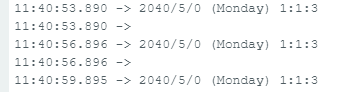

The next issue I found in the code was that it could not read the time that was displayed in a 24-hour format. This problem would cause it to stop displaying the hours on the light strip. I believe there is a method to change the format of the RTC to be in a 12-hour format but I was unable to figure that out. Instead, I decided to add a part in the code that would subtract 12 from whatever hour was displayed on the serial monitor or accessed by the RTC. I found this change in the code to be incredibly useful and it solved the problem that I had with the display of the lights after 12 hours.


The final part of the code that I needed to fix was an issue with the minutes. When the RTC reads the time at a full hour (3:00 for example) it does not display the hour as it should. The light strip should display "it is [hour] o'clock," but right now it does not do that. As of right now it omits the hour entirely so most of the strip is completely dark except for the "It is" and the "o'clock." In order to fix this I added another part to the code that accounts specifically for when the time falls between zero and five minutes. This code I added hasn't worked yet so I am still trying to figure out the solution to this issue.


Comments